Deploy Backend CI/CD with GitHub Actions
In this step, we will build an automated CI/CD pipeline using GitHub Actions to automatically package our Spring Boot application and deploy it sequentially to two EC2 instances running Docker. The deployment process utilizes AWS Systems Manager (SSM) and Amazon S3 as intermediaries.
1. Configure GitHub Repository Secrets
To ensure the security of sensitive information (such as AWS credentials, database URLs, passwords, etc.), we store these values in the GitHub Repository Secrets. These variables will be referenced directly in the pipeline YAML file without exposing them in the source code.
Go to Settings → Secrets and variables → Actions → New repository secret on your GitHub repository and configure the following variables:
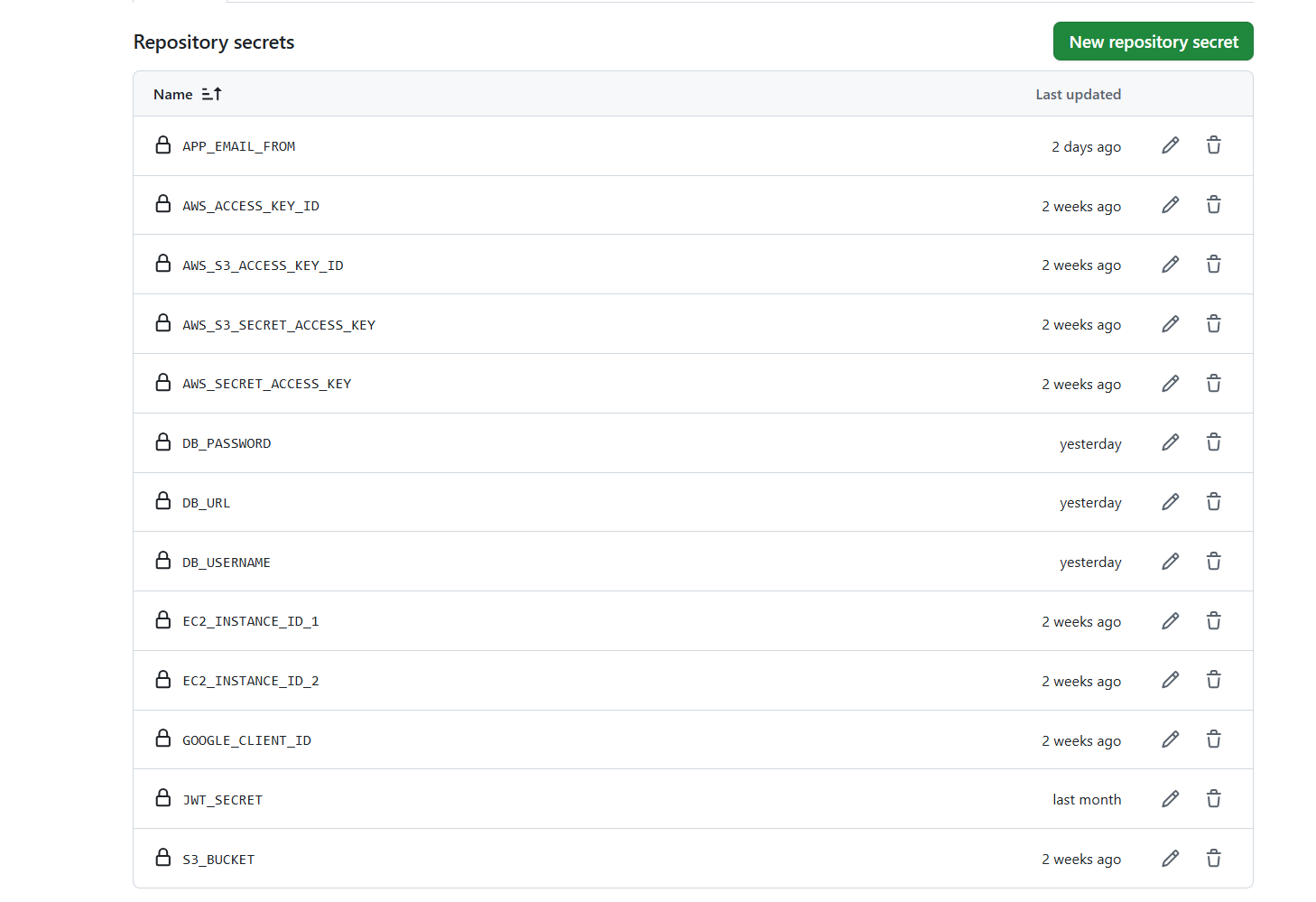
Details of Required Secrets:
- AWS & S3 Access Variables:
AWS_ACCESS_KEY_ID&AWS_SECRET_ACCESS_KEY: AWS IAM credentials for the CI/CD account to upload JAR files to S3 and send run commands to SSM.S3_BUCKET: The name of the S3 Bucket acting as the intermediate storage for build.jarfiles.
- EC2 Instance ID Variables:
EC2_INSTANCE_ID_1&EC2_INSTANCE_ID_2: The IDs of the two EC2 instances running the backend application in the Private Subnet.
- Database Connection Variables (RDS):
DB_URL: The JDBC connection string to the RDS PostgreSQL database.DB_USERNAME&DB_PASSWORD: Database login credentials.
- Application Configuration Variables (Rookwork):
JWT_SECRET: The encryption key used to sign JSON Web Tokens (JWT) for authentication.GOOGLE_CLIENT_ID: The Client ID for Google OAuth2 authentication.AWS_S3_ACCESS_KEY_ID&AWS_S3_SECRET_ACCESS_KEY&AWS_S3_BUCKET: Separate S3 configurations for user upload storage within the application.APP_EMAIL_FROM: The sender email address used by the system for sending notifications.
2. Pipeline Workflow (.github/workflows/deploy.yml)
The automation process is defined through the following main steps in the deploy job:
Step 1: Prepare Source Code and Build JAR
- Checkout code: Pulls the latest source code from the GitHub repository branch.
- Set up JDK 21: Installs and configures Java 21 environment (Temurin distribution).
- Build JAR: Runs
./mvnw clean package -DskipTeststo compile the source code and package it into a.jarfile (skipping test execution to optimize build time).
Step 2: Upload Build Artifact to Amazon S3
- Configure AWS credentials: Configures AWS authentication credentials.
- Set version tag: Determines the version tag. If triggered by Git tags (matching
v*), the tag name is used; otherwise, it defaults tolatest. - Copy JAR to S3: Uploads the compiled
.jarfile to the S3 Bucket using the AWS CLI:aws s3 cp target/*.jar s3://${{ secrets.S3_BUCKET }}/rookwork-backend-${{ steps.version.outputs.VERSION }}.jar
Step 3: Deploy Sequentially to EC2 Instances via AWS SSM
The CI/CD pipeline deploys to EC2-1 first, verifies that it runs successfully, and then proceeds to deploy to EC2-2. The workflow on each EC2 instance consists of:
- Generate Environment Parameters: Uses
jqto dynamically generate anssm-params-ec2.jsonfile containing the environment variables retrieved from GitHub Secrets. - Send SSM Run Command: Sends an
AWS-RunShellScriptcommand to the target server:
aws ssm send-command \
  --instance-ids "${{ secrets.EC2_INSTANCE_ID_1 }}" \
  --document-name "AWS-RunShellScript" \
  --parameters file://ssm-params-ec2-1.json
- Execution Commands on the EC2 Server:
- Downloads the
.jarfile from S3 to the server. - Builds a new Docker Image without cache to apply the latest code:
sudo docker build --no-cache -t rookwork-backend:[VERSION] . - Stops and removes the existing backend container.
- Launches a new Docker container running on port
8080, passing all the configuration parameters for the database, JWT, and S3 storage.
- Downloads the
- Monitor Deployment Status (Polling): The pipeline continuously checks the execution status of the SSM command every 15 seconds (up to 40 times ~ 10 minutes). If the status returns
Success, it proceeds to EC2-2. If it fails (Failed,Cancelled,TimedOut), the pipeline prints the error logs and exits immediately.
3. Pipeline Configuration Code
Below is the complete configuration code for the .github/workflows/deploy.yml file:
name: Deploy to EC2

on:
  push:
    branches: [main]
    tags:
      - "v*"

jobs:
  deploy:
    runs-on: ubuntu-latest
    steps:
      - name: Checkout code
        uses: actions/checkout@v3

      - name: Set up JDK 21
        uses: actions/setup-java@v3
        with:
          java-version: "21"
          distribution: "temurin"

      - name: Build JAR
        run: ./mvnw clean package -DskipTests

      - name: Configure AWS credentials
        uses: aws-actions/configure-aws-credentials@v4
        with:
          aws-access-key-id: ${{ secrets.AWS_ACCESS_KEY_ID }}
          aws-secret-access-key: ${{ secrets.AWS_SECRET_ACCESS_KEY }}
          aws-region: ap-southeast-1

      - name: Set version tag
        id: version
        run: |
          if [[ "${{ github.ref }}" == refs/tags/* ]]; then
            echo "VERSION=${{ github.ref_name }}" >> $GITHUB_OUTPUT
          else
            echo "VERSION=latest" >> $GITHUB_OUTPUT
          fi

      - name: Copy JAR to S3
        run: |
          aws s3 cp target/*.jar s3://${{ secrets.S3_BUCKET }}/rookwork-backend-${{ steps.version.outputs.VERSION }}.jar

      # ── Deploy EC2-1 first, wait for completion ─────────────────────────────────
      - name: Deploy on EC2-1 via SSM
        run: |
          set -euo pipefail

          jq -n \
            --arg version "${{ steps.version.outputs.VERSION }}" \
            --arg s3_bucket "${{ secrets.S3_BUCKET }}" \
            --arg db_url "${{ secrets.DB_URL }}" \
            --arg db_user "${{ secrets.DB_USERNAME }}" \
            --arg db_pass "${{ secrets.DB_PASSWORD }}" \
            --arg jwt_secret "${{ secrets.JWT_SECRET }}" \
            --arg google_id "${{ secrets.GOOGLE_CLIENT_ID }}" \
            --arg aws_key "${{ secrets.AWS_S3_ACCESS_KEY_ID }}" \
            --arg aws_secret "${{ secrets.AWS_S3_SECRET_ACCESS_KEY }}" \
            --arg aws_bucket "${{ secrets.AWS_S3_BUCKET }}" \
            --arg email_from "${{ secrets.APP_EMAIL_FROM }}" \
            '
            [
              if $db_url != "" then "-e DB_URL=" + ($db_url | @sh) else empty end,
              if $db_user != "" then "-e DB_USERNAME=" + ($db_user | @sh) else empty end,
              if $db_pass != "" then "-e DB_PASSWORD=" + ($db_pass | @sh) else empty end,
              if $jwt_secret != "" then "-e JWT_SECRET=" + ($jwt_secret | @sh) else empty end,
              if $google_id != "" then "-e GOOGLE_CLIENT_ID=" + ($google_id | @sh) else empty end,
              if $aws_key != "" then "-e AWS_S3_ACCESS_KEY_ID=" + ($aws_key | @sh) else empty end,
              if $aws_secret != "" then "-e AWS_S3_SECRET_ACCESS_KEY=" + ($aws_secret | @sh) else empty end,
              if $aws_bucket != "" then "-e AWS_S3_BUCKET=" + ($aws_bucket | @sh) else empty end,
              if $email_from != "" then "-e APP_EMAIL_FROM=" + ($email_from | @sh) else empty end
            ] | join(" ") as $env_flags |
            ("aws s3 cp s3://" + $s3_bucket + "/rookwork-backend-" + $version + ".jar /home/ec2-user/rookwork-backend-sb/rookwork-backend.jar --no-progress && cd /home/ec2-user/rookwork-backend-sb && sudo docker build --no-cache -t rookwork-backend:" + $version + " . && { sudo docker rm -f rookwork-backend 2>/dev/null; sudo docker run -d --restart always --name rookwork-backend -p 8080:8080 " + $env_flags + " -e JWT_EXPIRATION=604800000 -e JWT_REFRESH_EXPIRATION=2592000000 -e AWS_REGION=ap-southeast-1 rookwork-backend:" + $version + "; }") as $cmd |
            { "commands": [$cmd] }
            ' > ssm-params-ec2-1.json

          COMMAND_ID=$(aws ssm send-command \
            --instance-ids "${{ secrets.EC2_INSTANCE_ID_1 }}" \
            --document-name "AWS-RunShellScript" \
            --region ap-southeast-1 \
            --parameters file://ssm-params-ec2-1.json \
            --query "Command.CommandId" \
            --output text)

          echo "EC2-1 SSM Command ID: $COMMAND_ID"

          # Polling up to 40 times x 15s = 10 minutes (sufficient for docker build)
          for i in $(seq 1 40); do
            STATUS=$(aws ssm get-command-invocation \
              --command-id "$COMMAND_ID" \
              --instance-id "${{ secrets.EC2_INSTANCE_ID_1 }}" \
              --query "Status" --output text 2>/dev/null || echo "Pending")
            echo "[EC2-1] [$i/40] Status: $STATUS"
            if [ "$STATUS" = "Success" ]; then
              echo "EC2-1 deploy SUCCESS"
              break
            elif [ "$STATUS" = "Failed" ] || [ "$STATUS" = "Cancelled" ] || [ "$STATUS" = "TimedOut" ]; then
              echo "EC2-1 deploy FAILED with status: $STATUS"
              echo "--- EC2-1 Error Output ---"
              aws ssm get-command-invocation \
                --command-id "$COMMAND_ID" \
                --instance-id "${{ secrets.EC2_INSTANCE_ID_1 }}" \
                --query "{stdout:StandardOutputContent,stderr:StandardErrorContent}" \
                --output json || true
              exit 1
            fi
            sleep 15
          done
          if [ "$STATUS" != "Success" ]; then
            echo "EC2-1 deploy timeout after 10 minutes"
            exit 1
          fi

      # ── Deploy EC2-2 after EC2-1 successfully completes ──────────────────────────────
      - name: Deploy on EC2-2 via SSM
        run: |
          set -euo pipefail

          jq -n \
            --arg version "${{ steps.version.outputs.VERSION }}" \
            --arg s3_bucket "${{ secrets.S3_BUCKET }}" \
            --arg db_url "${{ secrets.DB_URL }}" \
            --arg db_user "${{ secrets.DB_USERNAME }}" \
            --arg db_pass "${{ secrets.DB_PASSWORD }}" \
            --arg jwt_secret "${{ secrets.JWT_SECRET }}" \
            --arg google_id "${{ secrets.GOOGLE_CLIENT_ID }}" \
            --arg aws_key "${{ secrets.AWS_S3_ACCESS_KEY_ID }}" \
            --arg aws_secret "${{ secrets.AWS_S3_SECRET_ACCESS_KEY }}" \
            --arg aws_bucket "${{ secrets.AWS_S3_BUCKET }}" \
            --arg email_from "${{ secrets.APP_EMAIL_FROM }}" \
            '
            [
              if $db_url != "" then "-e DB_URL=" + ($db_url | @sh) else empty end,
              if $db_user != "" then "-e DB_USERNAME=" + ($db_user | @sh) else empty end,
              if $db_pass != "" then "-e DB_PASSWORD=" + ($db_pass | @sh) else empty end,
              if $jwt_secret != "" then "-e JWT_SECRET=" + ($jwt_secret | @sh) else empty end,
              if $google_id != "" then "-e GOOGLE_CLIENT_ID=" + ($google_id | @sh) else empty end,
              if $aws_key != "" then "-e AWS_S3_ACCESS_KEY_ID=" + ($aws_key | @sh) else empty end,
              if $aws_secret != "" then "-e AWS_S3_SECRET_ACCESS_KEY=" + ($aws_secret | @sh) else empty end,
              if $aws_bucket != "" then "-e AWS_S3_BUCKET=" + ($aws_bucket | @sh) else empty end,
              if $email_from != "" then "-e APP_EMAIL_FROM=" + ($email_from | @sh) else empty end
            ] | join(" ") as $env_flags |
            ("aws s3 cp s3://" + $s3_bucket + "/rookwork-backend-" + $version + ".jar /home/ec2-user/rookwork-backend-sb/rookwork-backend.jar --no-progress && cd /home/ec2-user/rookwork-backend-sb && sudo docker build --no-cache -t rookwork-backend:" + $version + " . && { sudo docker rm -f rookwork-backend 2>/dev/null; sudo docker run -d --restart always --name rookwork-backend -p 8080:8080 " + $env_flags + " -e JWT_EXPIRATION=604800000 -e JWT_REFRESH_EXPIRATION=2592000000 -e AWS_REGION=ap-southeast-1 rookwork-backend:" + $version + "; }") as $cmd |
            { "commands": [$cmd] }
            ' > ssm-params-ec2-2.json

          COMMAND_ID=$(aws ssm send-command \
            --instance-ids "${{ secrets.EC2_INSTANCE_ID_2 }}" \
            --document-name "AWS-RunShellScript" \
            --region ap-southeast-1 \
            --parameters file://ssm-params-ec2-2.json \
            --query "Command.CommandId" \
            --output text)

          echo "EC2-2 SSM Command ID: $COMMAND_ID"

          for i in $(seq 1 40); do
            STATUS=$(aws ssm get-command-invocation \
              --command-id "$COMMAND_ID" \
              --instance-id "${{ secrets.EC2_INSTANCE_ID_2 }}" \
              --query "Status" --output text 2>/dev/null || echo "Pending")
            echo "[EC2-2] [$i/40] Status: $STATUS"
            if [ "$STATUS" = "Success" ]; then
              echo "EC2-2 deploy SUCCESS"
              break
            elif [ "$STATUS" = "Failed" ] || [ "$STATUS" = "Cancelled" ] || [ "$STATUS" = "TimedOut" ]; then
              echo "EC2-2 deploy FAILED with status: $STATUS"
              echo "--- EC2-2 Error Output ---"
              aws ssm get-command-invocation \
                --command-id "$COMMAND_ID" \
                --instance-id "${{ secrets.EC2_INSTANCE_ID_2 }}" \
                --query "{stdout:StandardOutputContent,stderr:StandardErrorContent}" \
                --output json || true
              exit 1
            fi
            sleep 15
          done
          if [ "$STATUS" != "Success" ]; then
            echo "EC2-2 deploy timeout after 10 minutes"
            exit 1
          fi
[!TIP] The rolling update strategy ensures high availability (Zero Downtime) when updating the backend application across the EC2 instances.